Introducing Specs: Technical context for your designs. When you use AI to create something, it’s surprisingly easy to turn an idea into a screen. What’s not easy is teaching the machine everything your team already knows.
A designer might know the checkout button should be removed once payment is complete, a product manager might know why a certain flow didn’t make it, a developer could tell you which component exists in the code, an analyst knows where users are dropping off in the journey. Your final design can’t tell that whole story.
To make it easy for teams to centralize all of this important technical and product context and easily connect it to designs and code, we’re introducing Figma Specs.
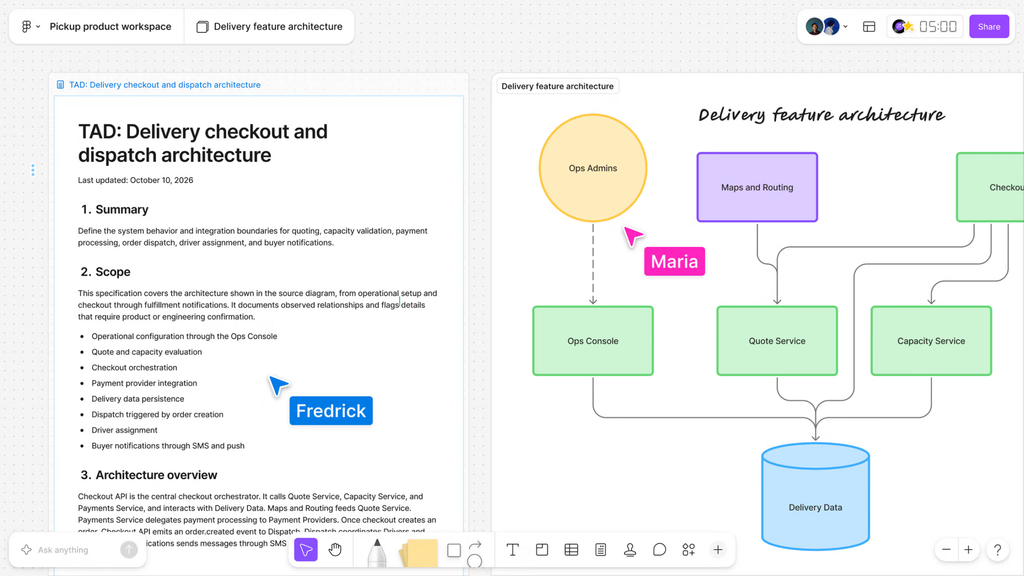
With Specs, you can easily connect your requirements, decisions, context, and more to the relevant design or code, so the next teammate or AI agent doesn’t have to piece them together from screenshots, meetings, and scattered files. Store Specs as their own files or attach them right in Figma Design or FigJam. You can use them to generate technical documentation from your designs, create Code Layers from your technical spec, compare multiple specs side-by-side, and more.
You can even create a Spec from a FigJam critique. Here’s an example: say your team is working on a subscription flow. The design may feature a price, a place to enter your card info, and a Subscribe button. The design itself doesn’t capture what happens when the card is declined, whether you can try again, who’s eligible for a discount, or what happens if your payment goes through but there’s an error updating your account. Such details aren’t just cosmetic extras; they are genuinely part of the product.
Specs also pull in context from other sources (via MCP), like analytics tools and codebases.
Over the past year, Figma has focused on giving AI agents greater access to its canvas, part of a bigger push around connectors and integrations in Figma, with Figma’s MCP Server for example sharing Figma data (from designs, FigJam diagrams, or from components in production) with code agents, bringing decisions made in Figma to where code gets written.
Similarly Figma’s design agent pulls in context about your design system(s) and canvases to make sure whatever is generated makes sense in the context of the product in question. As Figma puts it, an agent’s output depends on the context it receives.
Agents connected to Figma MCP can use figma-spec to create, update, or read Specs. This can be used to document the reasoning behind decisions that are made as the product is being built.
The opportunity here goes beyond just documentation though. It allows AI agents access to the ‘why’ behind the decisions made about what it has been asked to build. Specs opens that up to teams (and not just engineers) to share with AI agents more about what outcomes are desirable. It’s more than “Build this screen,”. It represents moving some of this context and decision making earlier in the process.
Taken together with the larger connector ecosystem around Figma (GitHub, Notion, Linear, Slack, Hex…), this brings product details closer to where teams are designing and building prototypes. And it represents an interesting pivot for Figma away from generation being the end all be all.
Specs are basically like documents within your Figma file which outline requirements.
Caveat emptor, of course the value of a specification tool is only ever as good as the specifications going into it, someone still has to diligently document their requirements, and answer tough product questions about vague requirements. An out of date spec will confuse an agent just like it will a developer. But as writing code (and presumably increasingly writing visual design too) gets easier and easier, I’d expect more and more of the moat to come from figuring out what you want to build and documenting those decisions, creating context for agents (and humans) as Figma says.
The new feature positions Figma as the connective tissue between deciding what to build, and building it. Part of what makes product handoff interesting right now is that context is everything when you have agents writing code to implement your design. Specs seem to be Figma’s attempt to make handoff easier by recording all that context along the way, starting with the requirements, through to design, through to implementation. Learn something new about the implementation? Write it back to the spec. Specs sound less like a momentary baton-pass, embodied by the handoff of a Figma file, and more like a shared evolving record/memory of a constantly changing product.
Figma Specs is in open beta now for eligible plans. Manually writing/updating a spec won’t consume AI credits, though invoking the Figma agent will.
Figma Specs is ultimately about keeping the reasoning behind a product connected to the design and code. As AI builds faster, that shared context may become just as important as the output itself.


